

The best time to test is before a design feels finished. When claiming for user testing and UX improvement, evidence is most useful if testing starts early, continues as the product develops and evaluates the experience after changes. Ask representative users to try realistic tasks, then use their actions and feedback to guide the next design decision.
It’s easy to leave testing until a product is nearly ready, but that can make important changes harder to incorporate. This article explains how early feedback can help teams improve prototypes and user journeys, why testing should be repeated as a design evolves, and how observations from real users can reveal friction that internal teams may overlook. You’ll also see how to turn findings into practical improvements, rather than collecting feedback without acting on it.
Key Takeaways
- Start testing early and repeat it as the design develops, so teams can spot friction and make changes before they become embedded.
- Use independent participants and realistic tasks to observe how people actually use a product, not just what they say about it.
- Keep clear records of test objectives, participant feedback, findings and the design changes made in response.
- Separate UX work linked to genuine product development from routine updates when assessing costs for a potential claim.
- Learn which common claim errors can weaken the evidence trail and how a specialist can help assess whether R&D Tax Credits are relevant.
Iterative testing and early design changes
Begin usability testing while a design can still change, then repeat it as the product develops. A feedback loop turns observations from users into design decisions and further tests.
Start with a prototype, not a finished product. Ask people from the intended audience to complete a realistic scenario, such as finding a feature or submitting a form. Observe where navigation, wording or task order causes friction. Record what participants do, where they hesitate and what they say, then compare their experience with the intended journey.
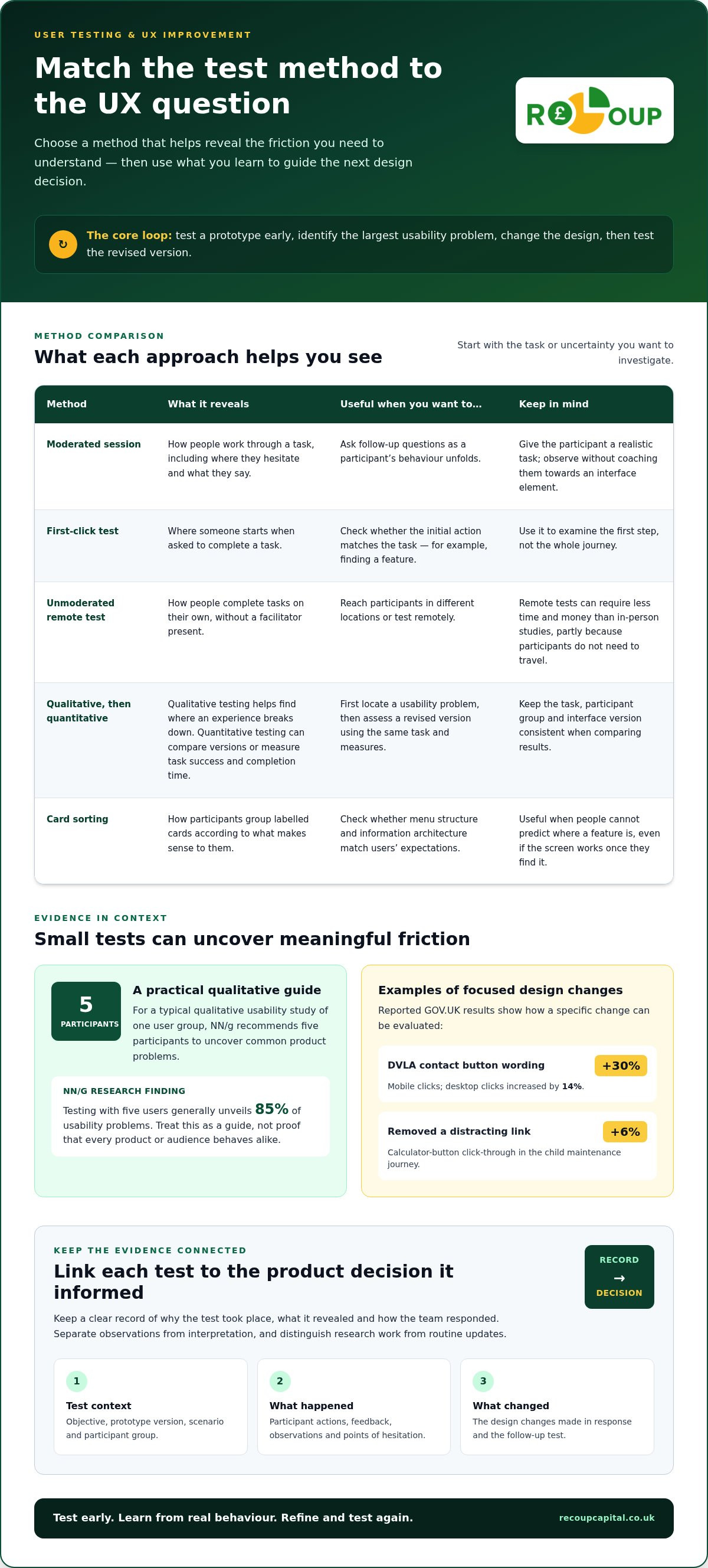
Early testing can assess mock-ups and semi-functional prototypes, before a team commits to detailed development. The method should match the question: a moderated session lets a facilitator ask follow-up questions, whilst a first-click test shows where someone starts a task. For example, GOV.UK reported that changing the DVLA contact button wording increased mobile clicks by 30% and desktop clicks by 14%. These results illustrate how a focused design change can be evaluated.
Make the feedback loop explicit: gather findings, identify the largest usability problem, change the design, then test the revised version. GOV.UK also reported a 6% increase in calculator-button click-through after removing a distracting link from its child maintenance journey. That example shows why teams should assess the whole scenario, rather than treating each interface element in isolation. Whether addressing interface issues internally or commissioning targeted design work from an agency like LYFE Studio, user research becomes valuable when findings lead to an action and a follow-up test.
Records supporting user testing claims
Records supporting user testing claims connect each test session to a product decision. Keep the test objective, prototype version, scenario, participant feedback, observations and resulting design changes together. Teams can record sessions and share them with colleagues who could not attend. A clear record explains why the test took place, what it revealed and how the team responded.
Calculating eligible UX improvement costs
To calculate eligible UX improvement costs, identify and group expenditure according to the work it supported. Separate time spent planning research, running sessions, analysing feedback and changing the design from unrelated product activity. UX testing costs are not automatically eligible for tax relief just because software development costs are under consideration. The activity and its supporting records determine the treatment.
Remote usability tests can require less time and money than in-person studies, partly because participants do not need to travel. Record the method and the work each cost relates to, then distinguish research from routine updates. This provides a clearer basis for reviewing the project than applying one broad cost assumption to every testing round.
Testing with independent, real users
Independent participants can expose assumptions that colleagues and familiar customers may share. For a typical qualitative usability study of one user group, NN/g recommends five participants to uncover common product problems. Its research found that testing with five users generally unveils 85% of usability problems. Treat this as a practical guide to finding issues, not proof that every audience or product behaves alike.
Recruit participants who match the target audience and the task being examined. If a service supports both first-time and returning users, decide which group the test concerns before recruiting. Participants should resemble the people expected to use the product, but shouldn’t be coached through the interface. Friends or family can offer opinions, yet their familiarity with the team may affect how they interact and what they report.
Give each participant a realistic scenario and observe what they do. For an online booking journey, ask someone to find an appointment and explain what they would do next. Avoid directing them towards a particular button. A first-click test shows whether the initial action matches the task, while think-aloud feedback can reveal why a label or page caused hesitation.
Choose a format that suits the question. In a moderated session, a facilitator can ask follow-up questions as behaviour unfolds. In an unmoderated remote test, participants complete tasks alone. Remote testing can reach people in different locations, while in-person observation may help teams study detailed interactions. Match the method to the audience, device and usability issue under review.
Use qualitative testing to find where an experience breaks down, then consider quantitative testing to compare versions or measure task success and completion time. If participants struggle to locate account settings, record the route they try, their errors and their comments. Test the revised version with the same task and measures to make the design decision easier to assess.
Information architecture may call for a different method. In card sorting, participants organise labelled cards into groups that make sense to them. This can show whether a menu structure matches users’ expectations before developers build it. Card sorting is useful when people can’t predict where a feature is, even if each screen works correctly once they find it.
Keep the task, participant group and interface version consistent when comparing results. If a later round changes both the wording and page layout, it may be hard to tell which change influenced behaviour. Note the conditions for each session, then separate observations from interpretation. This helps teams use user evidence without mistaking one participant’s preference for a shared pattern.
What records and evidence should be kept for user testing and UX improvement claims?
Build an evidence trail linking each user-testing activity to the product work it informed. For a checkout redesign, record the original issue, the test, what participants did and the resulting design decision. Keep records as work happens so the project history does not depend on memories reconstructed later.
Start with a dated project record identifying the product, team and version under review. Add the research objective, target audience, test format and participant tasks. For example, a test might explore whether first-time users can find delivery options. These details explain what the team set out to learn and distinguish one testing round from another.
- Test materials: retain the discussion guide, task scenarios, questionnaire and prototype or interface version used in each session.
- Session evidence: keep moderator notes, participant feedback and observations of actions, hesitation or errors. Product teams can record sessions and share videos with colleagues who could not attend.
- Analysis: save the findings, supporting examples and prioritised issues, distinguishing observed behaviour from the team’s interpretation.
- Decision trail: link each finding to a design change, a decision not to change something, or a planned follow-up test.
Use consistent identifiers to connect the records. A project name, date, version label and issue reference can link a recording to its analysis and design ticket. If participants miss a delivery-cost message, for instance, record which screen they saw and what the team changed. A later test can show whether the revised screen addressed the problem.
Keep evidence of the work involved alongside the research outputs. Timesheets or task records can show who planned and moderated sessions, analysed results or implemented interface changes. Invoices and internal cost records support the related expenditure, while notes explain which project activity each item concerns. Separate UX research from general meetings and routine content maintenance instead of grouping everything under one project label.
Check whether someone unfamiliar with the project can follow the sequence from question to outcome. They should be able to identify the tested version, understand the user evidence and see the decision that followed. A recording without analysis or a design decision gives limited context. Pair it with a concise summary naming the issue and linking it to the next action.
Keep the file structure practical: group material by project and testing round, then use descriptive file names. Label each recording with the journey, date and interface version, and store its findings beside the related design change. This makes evidence easier to retrieve when reviewing a claim and helps distinguish research outputs, development activity and associated costs.
How do you calculate eligible user testing and UX improvement costs?
Map each testing cost to a specific product activity instead of treating the whole UX budget as one amount. For a booking redesign, separate research planning, participant sessions, analysis and implementation. Then identify which work relates to developing or improving the product and which supports routine maintenance or general business activity.
Build the calculation from project records. Use staff time records to identify hours spent preparing scenarios, moderating sessions, analysing findings and applying design changes. Match those hours to payroll records and the relevant project period. If a designer splits time between a new checkout journey and routine page updates, record each activity separately rather than assigning all their time to testing.
Group external costs by the work supplied. If collaborating with an external specialist, such as ecommerce web design agency Britecode, an invoice might cover usability testing and conversion improvements alongside technical development. Keep the invoice with the project notes and identify the portion linked to the testing activity. Record participant incentives, software subscriptions and equipment by purpose instead of automatically adding them to one UX cost total.
Remote usability tests can require less time and money than in-person studies, and participants don’t need to travel. Compare actual project records rather than relying on a general assumption about which format costs less. Remote sessions may involve recruitment and platform costs, while an in-person study may involve venue arrangements. Attribute each expense to the format and work it supported.
Distinguish user research from the work that follows it. If a test identifies confusion in a prototype, the session and analysis are research activities, while redesigning the flow is a separate task. Record both and assess each in context. A routine wording refresh may relate differently to product development than work resolving a technical uncertainty about completing a complex journey.
Use a cost schedule showing the activity, date, people involved, time or invoice value and project link. For example, a row could connect a researcher’s analysis time to findings from a named checkout test. Reconcile the schedule against invoices, payroll and project records. This makes the calculation easier to follow and helps prevent duplicated hours or expenses across project budgets.
Review cost categories against the project evidence before including them in a relief calculation. A usability test does not make every associated expense eligible. The work performed, its relationship to the product activity and the supporting records all matter. Keep explanations concise, especially for costs covering mixed work, so the calculation can be traced from source record to project total.
What are common mistakes and risks when claiming UX improvement costs?
A frequent mistake is treating every UX activity as part of one qualifying project. A team might combine a new checkout prototype, routine page maintenance and a brand refresh in one budget, even though these activities have different purposes. Review each task separately and link it to the work it supported instead of relying on a broad project label.
Another risk is assuming that user testing alone establishes the nature of the work. Checking whether people understand existing instructions may differ from testing a new product function. Recording feedback on button colours, for example, does not explain why a team needed to develop or change the underlying product. Describe the problem, the work undertaken and the design response accurately.
Weak links between evidence and costs can also undermine a calculation. If an invoice covers research, content updates and unrelated design work, assigning the full amount to one UX project obscures what the supplier delivered. Split costs using the available breakdown and keep the allocation basis with the project records. Apply the same discipline to staff time shared across tasks.
- Broad descriptions: Replace labels such as “UX work” with clear task descriptions, such as analysing a prototype’s navigation.
- Routine work included: Distinguish an ordinary text correction from a change prompted by a documented usability problem.
- Duplicated costs: Check that the same researcher hours or supplier invoice don’t appear under multiple project totals.
- Unsupported conclusions: Don’t present a positive test result as proof that every design change achieved its intended effect.
Timing matters to the evidence trail. A project summary written long after testing may not match the original scenario, prototype or participant feedback. Keep dated notes as work progresses. If a team changes a form after observing users struggle, record the test version, the issue observed and the subsequent change. This makes the reasoning easier to follow.
Take care with metrics. A higher click rate may show that more people selected a button, but it does not explain why or whether they completed the task. Pair quantitative results with the task context and relevant observations. Note whether users reached the correct information, for example, not just whether they clicked the revised link.
Before finalising a cost calculation, compare each entry with its project records and remove unrelated or duplicated activity. A clear description should connect the expenditure to a specific task and explain the work performed. Discuss how project records support a claim when you need help assessing the evidence and costs.
Recoup Capital: R&D Tax Credits
Recoup Capital helps UK limited companies assess and claim R&D Tax Credits for innovation projects. If user testing forms part of work to resolve technical uncertainty during product development, review the wider project and its records rather than treating UX testing as automatically eligible. The distinction between routine design updates and work addressing a technical challenge matters.
Recoup Capital helps businesses assess project activities and associated costs, then determine whether an R&D tax claim may be appropriate. Clear testing records, development notes and cost information can support that assessment. For companies investing in innovation, a careful review can clarify potential relief and inform future business decisions.
Contact Recoup Capital about R&D Tax Credits to discuss your project.
Turn user insight into a considered next step
As your product evolves, connect UX research to the decisions it informs. This gives your team a clearer view of how design work supports innovation and a stronger basis for reviewing related project costs. If you’re considering claiming for user testing and UX improvement, assess the activity in the context of wider development work, not as a standalone testing exercise.
Recoup Capital helps UK businesses assess whether project activity may support an R&D Tax Credits claim. The firm also offers Capital Allowances and Land Remediation Relief for businesses reviewing other potential tax reliefs. A focused discussion can help you understand how project records and cost information fit into the assessment.
Contact Recoup Capital to discuss your project. Take the next step with clarity and confidence.
Frequently Asked Questions
What does claiming expenses for user testing and UX improvement mean?
It means identifying business expenditure connected with research into how people use a product and improvements made in response. For example, a company might record costs for testing a new booking feature separately from general website upkeep. Claiming for user testing and UX improvement is not a separate automatic allowance: the work’s nature and purpose, and its tax treatment, all need consideration.
Can businesses claim user testing and UX design costs as tax-deductible expenses in the UK?
Some costs may be treated as business expenditure, but user testing or UX design isn’t automatically tax-deductible just because it supports a company website or product. The activity and its purpose matter. Testing a new product feature and refreshing existing website copy are different kinds of work. Keep invoices and project records that explain the activity, then assess the appropriate treatment for the company’s accounts and tax position.
Can UX improvement work qualify for UK R&D tax relief?
UX work may form part of a wider project considered for R&D tax relief, but a usability test or improved interface does not qualify automatically. The assessment considers the wider project, its activities and associated costs. Research into a new digital function, for example, should be considered in context rather than claimed solely because users tested a prototype. UK-registered limited companies, including PLCs, can explore R&D Tax Credits for qualifying innovation activity.
What are the rules for claiming user research costs as a sole trader or limited company?
R&D Tax Credits are for UK-registered limited companies, including PLCs, so a sole trader cannot claim through this company scheme. A limited company should assess user research as part of its wider project and keep records of the activity and related costs. Sole traders must consider expenses under the tax rules for their business structure, which are separate from company R&D Tax Credits.


